Answering reviews with ChatGPT or with a tool? What you can build yourself
Guide · Reviews · · updated · 3 min · by the Renver team
Quick answer
Summary
You can build it yourself, and for a single restaurant it can be cheap. The hard part is not asking the AI for the text: it is having a base of confirmed facts, a filter that separates what the AI may answer from what needs a person, a second check before publishing, and numbers to tell whether it works. Without those four parts, the system publishes mistakes in the restaurant's name.
Answering reviews with AI looks like an afternoon's work: take the review, ask for the reply, publish. For a single restaurant you really can build something of your own. What separates an afternoon of play from a system you trust is what exists before and after the text.
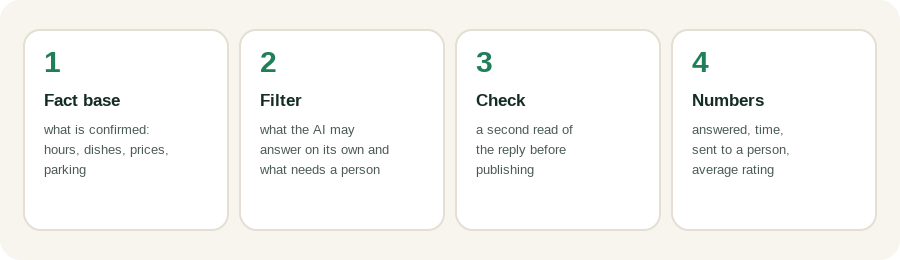
1. A base of confirmed facts
Start with a single sheet on the restaurant: address, hours, cuisine, dishes with prices, parking, high chairs, accessibility. For every item you are not sure about, write “not confirmed”.
This sheet is the most important part. Any AI can answer “reply to this review”. What changes the result is asking “reply using only these facts and invent nothing”. Choose one fact per reply, the one that helps the reader most (fact density). Add the tone too: for example, “friendly, short, no advertising language” — and fixed rules, such as do not offer a discount, do not promise a refund, do not admit fault.
2. A filter before writing
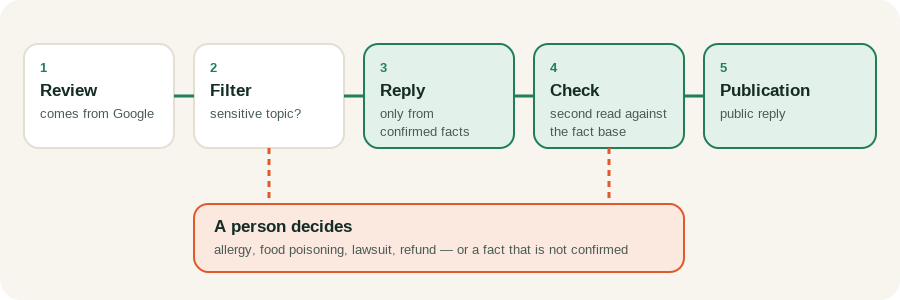
Before any reply is generated, a separate step classifies the review: is it safe to answer on its own, or does it need a person? “The food arrived cold” can be answered. “My son got sick after eating here” cannot. Do the same with allergy, food poisoning, a threat of legal action, refunds, accusations of fraud, discrimination and physical safety. A low rating on its own is not a reason to block (how to answer complaints).
3. A second check before publishing
The AI that writes should not be the only one that reads the text. A second check compares the reply with the sheet: if the reply says “we have free parking” and the sheet says “not confirmed”, it is stopped and the review goes to a person. The path becomes: review, classification, reply, fact check, publication — not review, ChatGPT, publication.
4. Simple numbers to track
Before measuring whether the restaurant appears in AI answers — an unstable measure — track what you control:
- the share of reviews answered;
- the average time to reply;
- the share answered automatically and the share sent to a person;
- how many replies the check stopped;
- the change in the average rating.
What you can build yourself, and what is hard
The fact sheet, the rules and a test flow with 50 to 100 real reviews are quite doable for someone with time and some technical knowledge. The secure connection to the Google profile, keeping it working when the rules change, alerting a person in time, and the restaurant page with structured data (how) are hard.
In March 2026 a test by Google itself was spotted: an option to reply to reviews with AI inside Business Profile, which showed up only on some accounts. It suggests a text for the review; Google does not say what that suggestion knows about your menu or what it avoids promising, so the fact sheet and the check stay with you.
Renver does this whole set for restaurants: replies with confirmed facts, a sensitivity filter, a check before publishing, a restaurant page and a monthly report — without promising that the restaurant will appear in ChatGPT. If you want to test before deciding, the pilot runs at one location; the step by step shows the path of each review.
Sources
Want this running at your restaurant?
Renver prepares and checks replies to the Google reviews that are safe to answer, using facts from your menu, and sends only the sensitive ones to the manager. Pilot programme at a founder price.
See the pilot programme