Restaurant menu: PDF or HTML? What Google and AI can actually read
Guide · Structured data · · updated · 2 min · by the Renver team
Quick answer
Summary
Publish the menu as a text page (HTML) on your website, with the dish name, a short description and the price. Google indexes PDF, so a PDF with selectable text is not invisible, but a page has an address of its own, opens well on a phone and is easy to update. A menu that is only a photo, or a PDF made of images, depends on reading text out of a picture and has no guarantee of being read. The PDF can stay as a printable option.
The question “where can I get moqueca capixaba under R$ 100 downtown?” can only be answered by someone who knows three things: that you serve moqueca capixaba, what it costs, and where you are. If your menu is a photo on Instagram or a scanned PDF, the first two pieces of information depend on a search engine being able to read text out of a picture, and that comes with no guarantee.
Format by format
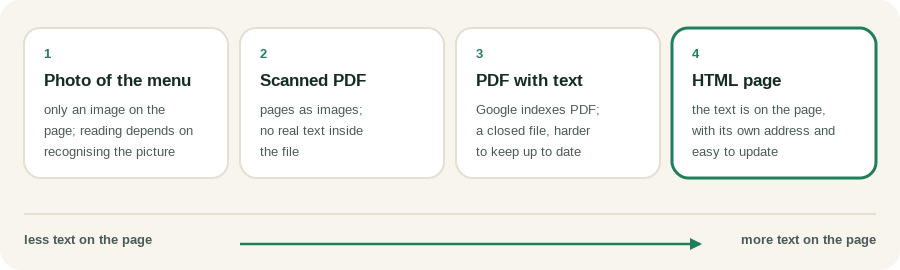
| Format | What is known | Practical limit |
|---|---|---|
| Photo of the menu | There is no text on the page, only an image | Depends on image recognition, no guarantee |
| PDF with selectable text | Google lists PDF among the file types it indexes | A closed file: no address per dish, harder to update and to read on a phone |
| Scanned PDF (pages as images) | There is no real text inside the file | Falls into the same case as the photo |
| Link to a delivery app | The menu is on the app's page | The fact lives on the app's page, not on yours |
| HTML page with text | The text is on the page, with an address of its own | Easier to read, to update and to tie to the rest of your site's data |
How to build the page
- Sections as in the dining room: starters, mains, desserts, drinks.
- Each dish with a name, a one-line description and a price.
- Useful markings: vegan, gluten-free, spicy — they help people searching by dietary need (the questions guests ask AI).
- Structured data: in the
Restaurantmarkup Google recommends amenufield holding the address of the menu page.Menu,MenuSectionandMenuItemdescribe each dish in detail, but Google does not require those types and lists no rich result of its own for a menu. See the schema.org guide for restaurants. - A visible last-updated date in the page footer.
An HTML menu is also the source of the facts used in replies to reviews: when a guest praises a dish, the reply uses the name exactly as it appears on the menu (more in Portuguese). See five practices that keep your facts correct.
See also: keeping the menu, prices and opening hours up to date everywhere and what to put on a restaurant page without a website.
Sources
Want your restaurant page kept up to date?
Renver builds the restaurant page from your menu and keeps it current with the facts you confirm. Pilot programme at a founder price.
See what the page looks like